Wassup in a Minute AI Video Maker
Wassup, been a minute. One photo and you take the center while our two dancers keep the sides. Three photos and your friends take the left and the right. Hands on heads, the thumbs-up close-up, the walk up the hill and the freestyle, all on the beat. 15 seconds in 4:3, plus a vertical copy for posting.
- 15 s
- 4:3 + vertical 9:16
- one or three photos
- 10 credits

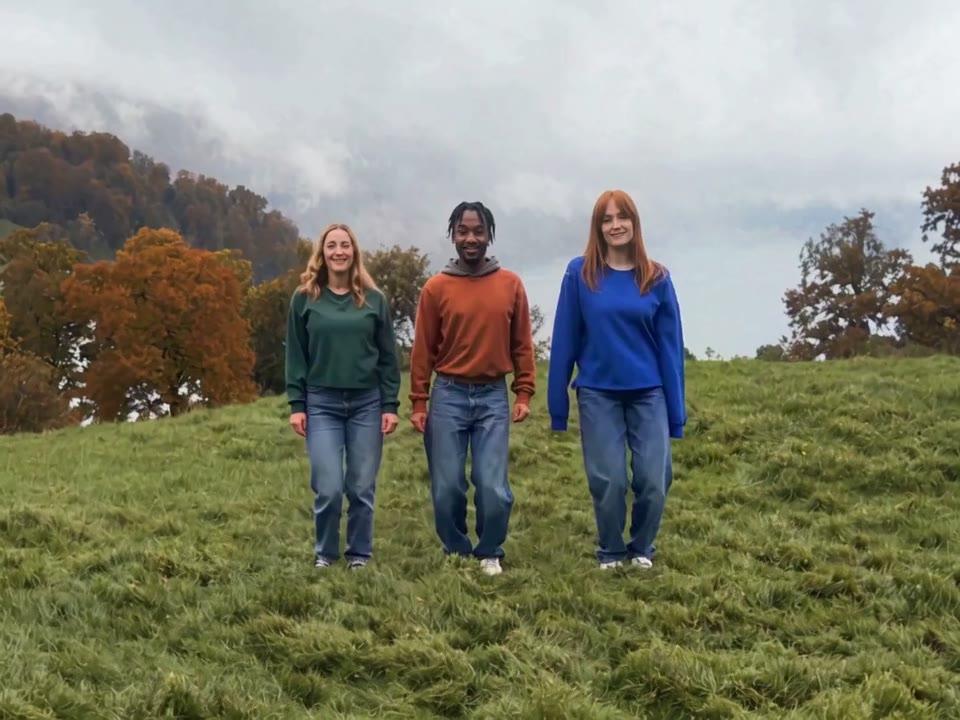


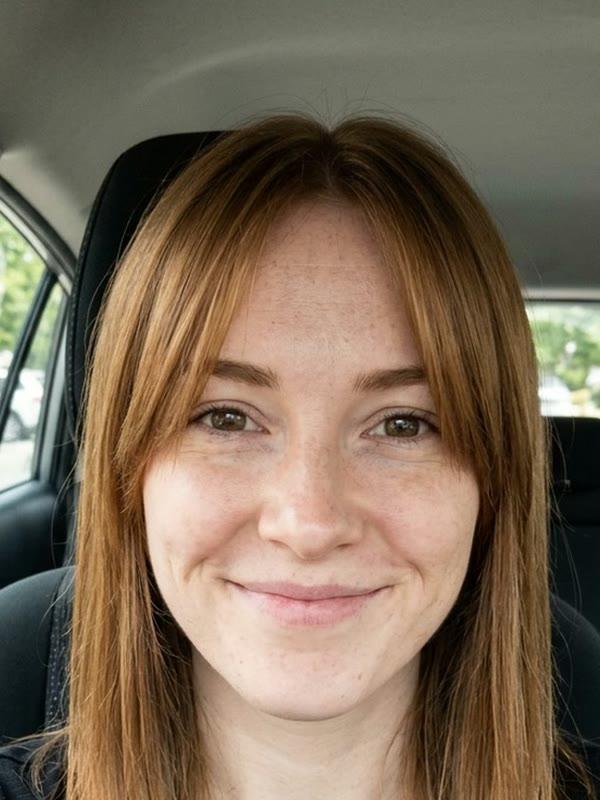
Real output · Three photos → the hillside trio
Wassup in a Minute · 15 s
One photo: you take the center and our two dancers keep the sides. Three photos: one for each spot.
- Face toward the camera in even light; a selfie works
- One person per photo, face clear, no sunglasses
- Each spot keeps its own crewneck and jeans
By uploading, you confirm you're the people in the photos or have their permission to use them.
From $9.99 · one-time · no subscription
- ✓ One-time payment
- ✓ 4:3 + 9:16 HD MP4 · no watermark
- ✓ Failed videos return the credit
- ✓ Photos deleted after 30 days
What happens in 15 s
The moves people know, in order and on the beat. Only the star changes.
01 · 0:00
Bounce
All three bounce on the grass, hands on their heads.
02 · 0:03
Thumbs
Center steps into a close-up and points both thumbs at the camera.
03 · 0:07
Walk up
The three walk up the slope toward the camera, side by side.
04 · 0:10
Freestyle
They spread out down the hill and freestyle to the end.
Real results
One or three photos in, the 15 s video out. Straight from the studio, no edits after.

Sample input photos are AI-generated stand-ins, not customer photos. The videos are unedited output.
Who should you cast?
The group chat
The three who always say they'll hang out soon. Now they have, on a hill.
Cast them →Just you
One photo: you lead, our two dancers back you up.
Cast them →Long-distance friends
Been a minute since you were all in one place? Send it to the other two.
Cast them →The roommates
Three photos, three spots, one very serious bounce.
Cast them →
The trend · Oct 2026 · TikTok
What is the Wassup in a Minute AI trend?
Wassup in a Minute is a TikTok dance trend from late October 2026, set to Zbee's jersey club remix of "From Time" by Drake featuring Jhené Aiko and named after a misheard line in the remix; you'll also see it searched as Wassup Been a Minute AI. In its trio format, three friends dance on a misty green hillside: a bounce with hands on heads, a close-up with both thumbs pointing at the camera, a walk up the slope and a loose freestyle, each cut landing on the beat.
Here the hillside, the moves and the cuts come ready-made. Upload one photo and you dance in the center while our two dancers keep the left and the right, or upload three and cast your friends: the Wassup in a Minute Dance AI video with everyone's own faces.
Add the Wassup in a Minute sound
How to make the Wassup in a Minute AI video
- 1
Add one photo or three
Upload a clear photo for the center spot above. Alone, that person dances in the center with our two dancers at the sides, or add a photo for the left and one for the right too. Face toward the camera in even light; a selfie works. No account needed.
- 2
Pay once
Pick a pack and check out. Usually ready in about 10–20 minutes, always within the hour; we email you the link.
- 3
Download
Save the 15 s · 4:3 + vertical 9:16 · silent MP4 — both files come with it.
- 4
Add the sound and post
Upload it in TikTok and tap Add sound. Search "wassup in a minute" and pick the jersey club remix of "From Time". Start the sound on the first frame; every cut lands on the beat from there.
Credits that work on every effect
Buy once, no subscription. Most videos take 10 credits (Hotel Lobby and Tiny Desk: 20). Credits stay valid for 2 years, and if a video fails its credits come straight back.
- One-time payment · No subscription
- Credits work on every effect · credits stay valid for 2 years
- Failed generations automatically return your credits
- No watermark
Wassup in a Minute AI: questions
What is the Wassup in a Minute AI video?
It's the Wassup in a Minute dance trend with your faces: three friends on a misty hillside bounce, point their thumbs at the camera, walk up the slope and freestyle, cut on the beat. You get a 15-second MP4 in 4:3 plus a vertical copy, made from one photo or three.
What song is Wassup in a Minute?
A jersey club remix of "From Time" by Drake featuring Jhené Aiko, made by the producer Zbee. The trend is named after a line people hear in the remix, so it's also spelled "wassup been a minute" or "wassup wait a minute"; all of them lead to the same sound on TikTok.
Is this the anime version of the trend?
No. The trend has two looks: animated characters swaying one after another, and friends dancing on a misty hillside. This effect makes the hillside one, a lifelike video with your faces on the three dancers. It doesn't turn you into a cartoon.
How many photos do I need?
One or three. With one, you take the center and our two dancers keep the left and the right. With three, each friend gets a spot: center, left and right. Two photos aren't supported, so add a third or remove one for a solo.
Who goes in the center, left and right?
The center leads: they're in the middle of every wide shot and get the thumbs-up close-up. Left and right dance beside them and stay in every shot. The upload boxes are laid out the same way, left to right.
Do my clothes come along?
No. Each spot keeps its outfit: rust orange in the center, cobalt blue on the right and forest green on the left, all with jeans. Your face, hair and skin tone come from your photo. A hood or collar from the photo can sometimes show at the neckline.
Does the Wassup in a Minute video come with the song?
No, both files are silent, so nothing gets muted for copyright. Add the "wassup in a minute" sound in TikTok or Reels and start it on the first frame; the cuts are timed to it.
How long is it, and why two files?
15 seconds. It's made in 4:3, and you also get a vertical 9:16 version with the full picture over a blurred background, for TikTok, Reels and Shorts.
Which photos work best?
A clear photo of one person looking at the camera, in even light. A selfie is fine; on effects that keep your clothes, a waist-up or full-length shot carries the outfit through (each effect page says what carries over). Skip group shots, sunglasses, masks and beauty filters.
How long does a video take?
Usually ready in about 10–20 minutes, always within the hour. You don't have to wait on the page: we email the link as soon as it's done.
Is it free? What does it cost?
There's no free tier. Most videos take 10 credits (Hotel Lobby and Tiny Desk take 20): standard videos start at $9.99, while 20-credit effects start at $14.99. Packs of 30 credits are $19.99 and 100 credits are $49.99. You pay once — no subscription. Credits work on every effect, last 2 years from your latest purchase, and a video that fails gives its credits back automatically.
What if my video doesn't look right?
Press "Needs work" on the result page and say what's wrong. A person on our team reads it and answers by email. If a video can't be made at all, its credits are returned without you asking.
Can I make a video of someone else?
Yes, with their OK. Surprising a friend is half the fun, but never use a stranger's or a celebrity's photo, and never pass the video off as real footage.
Do I need to dance or film anything?
No. You never film, learn a move or edit. Upload one clear photo of each person and you get the whole trend back with them in it, move for move.
How is this different from a CapCut template?
A template still needs footage of the people doing the trend; you film the clips and drop them in. Here you only upload a photo, and the finished video comes back with them performing it. Some editing templates are free; videos here start at $9.99, while 20-credit effects start at $14.99. Pay once, no subscription.
Is it safe? What happens to my photo?
Your photo is used for one thing: making your video. It is never used to identify anyone, never sold and never used to train models. Uploads and finished videos are deleted automatically after 30 days, or sooner if you email support. Payment runs through a secure checkout, so your card never touches our servers. One video needs no account; credits you keep for later live in a password-free account (an emailed code or Google).
Can I use a photo of a child?
No. Photos of anyone under 18 are not allowed. Use a photo of yourself or of an adult who agreed to it.
Can I post it on TikTok, Instagram Reels or YouTube Shorts?
Yes. The video is yours to post on personal and social accounts, as long as you have the rights to the photo and the person in it agreed. Mark it as AI-generated and don't present it as real. Brand and business accounts should use licensed audio, such as TikTok's Commercial Music Library.
Try another effect
All effects →- Trio19 s10 credits
Gangnam Style
Three of you in sunglasses on a night rooftop, each taking a turn at the camera.
Use effect → - 1–2 photos11 s10 credits
Ice Ice Baby Dance
Two of you, one icy court, one perfectly synced 90s routine. Kicks, knee lifts, hands up: stop.
Use effect → - 14 s10 credits
Pick It Up Dance
Your photo does the whole make it jump routine under the parking-lot lights, from the bounce to the star jump.
Use effect → - Duo8 s10 credits
Hop Hop Hop Dance
Two of you, one squish: three presses from across the room, a swap, and the payback.
Use effect →