Rubber Band Prank AI Video Maker
Aim. Release. Regret. You creep up behind someone wiping the kitchen table, stretch a long green band to full length and let go. It flies straight back into your own face. Then comes the brave face, the hand on the cheek and a dab of cream, while they barely look up. Add a photo of their face too, or let our housemate play it. 15 seconds, vertical, snap sound included. No band, no bruise.
- 15 s
- vertical 9:16
- one or two photos
- 10 credits

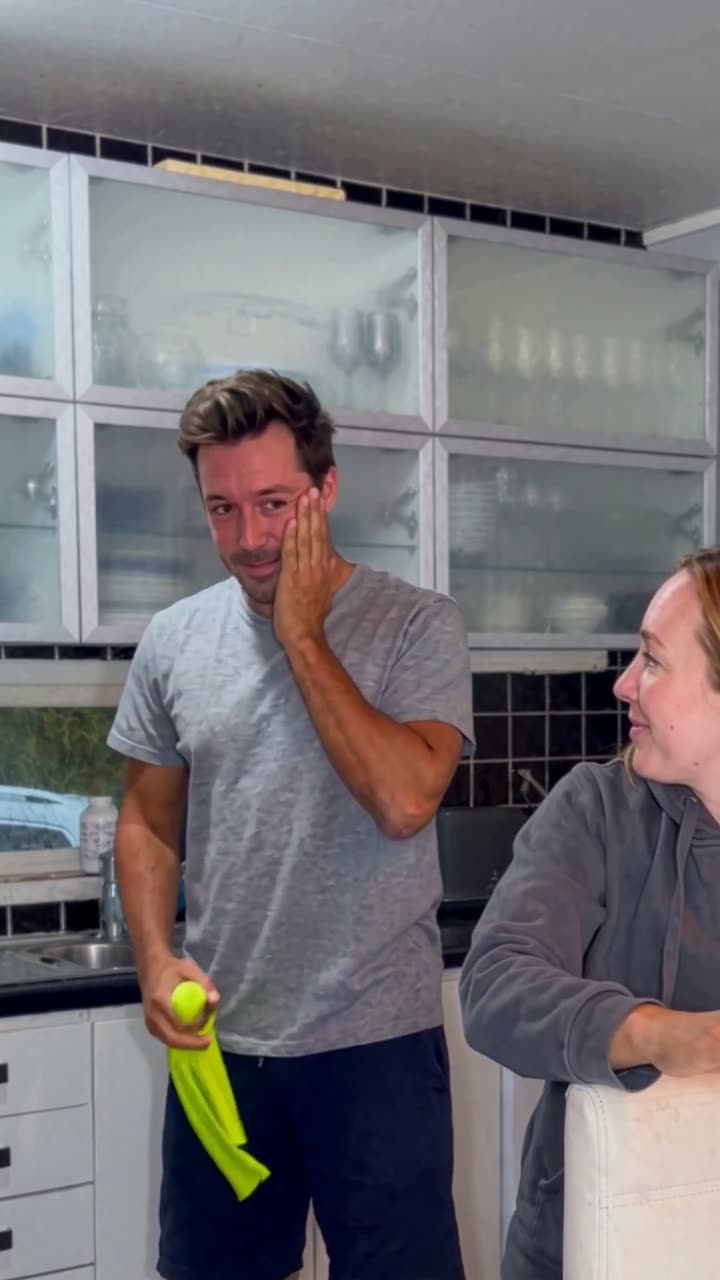


Real outputTwo photos: he pulls the prank, she stays at the table
Rubber Band Prank · 15 s
- A clear photo of each face, looking toward the camera: a selfie works
- The first photo gets the band in the face, so choose wisely
- One adult per photo, no sunglasses, nothing covering the face
By uploading, you confirm you're the people in the photos or have their permission to use them.
From $9.99 · one-time · no subscription
- ✓ One-time payment
- ✓ 9:16 HD MP4 · no watermark
- ✓ Failed videos return the credit
- ✓ Photos deleted after 30 days
What happens in 15 s
The moves people know, in order and on the beat. Only the star changes.
01 · 0:00
Lining it up
Band pulled to full length, aimed at the back of the one wiping the table.
02 · 0:03
Let go
The band leaves the hand with a whoosh.
03 · 0:04
Backfire
Snap: it comes straight back into the prankster's own face.
04 · 0:05
Brave face
A hand on the cheek, a smile that isn't fooling anyone.
05 · 0:07
First aid
A little bottle of cream, dabbed on carefully.
06 · 0:13
Busted
The one at the table finally looks up and smiles.
Real results
One or two photos in, the 15 s video out. Straight from the studio, no edits after.
Sample input photos are AI-generated stand-ins, not customer photos. The videos are unedited output.
Who should you cast?
Your boyfriend
Every couple has one person who'd try this. Make it them.
Cast them →Your girlfriend
Turn the tables: she plots the prank, you get to stay at the table.
Cast them →Housemates
The one who leaves dishes in the sink gets the band. Fair is fair.
Cast them →Just you
One selfie is enough: you take the snap and our housemate never notices.
Cast them →
The trend · Nov 2026 · TikTok
What is the rubber band prank trend?
The rubber band prank (also posted as the rubber band prank backfire, or rubber band prank gone wrong) is a TikTok couples trend from November 2026. One person sneaks up behind their partner in the kitchen, pulls a long resistance band as far as it will go and aims it at their back. On release it whips back into the prankster's own face. The rest of the clip is the aftermath: holding a stinging cheek, pretending it was fine and quietly putting cream on it while the target carries on wiping the table.
Here nobody has to get hit. One photo puts your face on the prankster, and a second photo puts someone else at the table; leave it out and our made-up housemate, a red-haired man with a beard, sits there instead. You get a 15-second vertical MP4 with the whoosh and the snap already in it, ready for TikTok, Reels, Shorts or the group chat.
The snap is already in it
How to make the Rubber Band Prank AI video
- 1
Add one or two photos
Upload a clear photo of the prankster: the one who stretches the band and takes it in the face. A second photo is up to you: that person wipes the table and never notices. Leave it empty and our made-up housemate sits at the table. A clear photo of each face, looking toward the camera: a selfie works. No account needed.
- 2
Pay once
Pick a pack and check out. Usually ready in about 10–20 minutes, always within the hour; we email you the link.
- 3
Download
Save the 15 s · vertical 9:16 · MP4 with sound.
- 4
Post or send it
Your video comes with the whoosh, the snap on the hit and a quiet kitchen in the background: post it or send it as it is. Want a TikTok sound on top? Tap Add sound and turn your clip's own sound down a little rather than off, so the snap still lands. Post it as a reply to a rubber band prank video, or caption it with who had it coming.
Credits that work on every effect
Buy once, no subscription. Most videos take 10 credits (Hotel Lobby and Tiny Desk: 20). Credits stay valid for 2 years, and if a video fails its credits come straight back.
- One-time payment · No subscription
- Credits work on every effect · credits stay valid for 2 years
- Failed generations automatically return your credits
- No watermark
Rubber Band Prank AI: questions
What is the rubber band prank AI video?
It's the rubber band prank backfire trend with your face: one person stretches a long green band behind someone wiping a kitchen table, lets go, and it snaps back into their own face, followed by the hand on the cheek and the cream. You get it as a finished 15-second vertical MP4 with the snap sound, made from one or two photos.
Which photo is the prankster?
The first one. That person stretches the band, takes the snap and does the whole aftermath. The second photo is the person at the table who wipes it and never notices; it's optional. The two parts aren't tied to anyone's gender, so put whoever deserves it in either one.
Can I make it with just one photo?
Yes. With one photo you're the prankster and our made-up housemate, a red-haired man with a beard in a grey hoodie, sits at the table. The price is the same with one photo or two.
Do I need a real band or a camera, and can the real prank hurt?
You don't need a band, a kitchen or a camera, and nobody gets hurt. Snapping a real resistance band at someone, or at yourself, can injure an eye, which is a good reason to make this version instead.
Does the video come with sound or a song?
Yes. It comes with a whoosh as the band flies, a sharp snap on the hit and quiet room sound, already in sync. There's no music or voice, so you can post it as it is or add a TikTok sound on top.
Which photos work best?
One clear photo per person, face toward the camera, in even light: a selfie or a head-and-shoulders shot is plenty, because only the face and hair carry over. Skip sunglasses, masks, heavy filters and group photos.
Is there a rubber band prank CapCut template?
There are editing templates for the backfire clip, but a template only cuts and captions footage you film yourselves, so you'd still need a band, a kitchen and someone willing to take the hit. Here you add one or two photos and get the whole scene back, snap sound included.
Will it look like us?
Faces and hair come from your photos, so a clear, front-facing photo of each person works best, even a selfie. Clothes are the same in every video: a grey T-shirt and navy shorts for the prankster, a grey hoodie for the one at the table. The kitchen is always the same kitchen.
Can I do it with my cat or dog, or a celebrity?
No. Use photos of yourself or of adults who've said yes; celebrities and other public figures aren't allowed. Pets aren't supported on this page. If you'd like a pet version, tap Request a trend in the library.
How long does a video take?
Usually ready in about 10–20 minutes, always within the hour. You don't have to wait on the page: we email the link as soon as it's done.
Is it free? What does it cost?
There's no free tier. Most videos take 10 credits (Hotel Lobby and Tiny Desk take 20): standard videos start at $9.99, while 20-credit effects start at $14.99. Packs of 30 credits are $19.99 and 100 credits are $49.99. You pay once — no subscription. Credits work on every effect, last 2 years from your latest purchase, and a video that fails gives its credits back automatically.
What if my video doesn't look right?
Press "Needs work" on the result page and say what's wrong. A person on our team reads it and answers by email. If a video can't be made at all, its credits are returned without you asking.
Can I make a video of someone else?
Yes, with their OK. Surprising a friend is half the fun, but never use a stranger's or a celebrity's photo, and never pass the video off as real footage.
Is it safe? What happens to my photo?
Your photo is used for one thing: making your video. It is never used to identify anyone, never sold and never used to train models. Uploads and finished videos are deleted automatically after 30 days, or sooner if you email support. Payment runs through a secure checkout, so your card never touches our servers. One video needs no account; credits you keep for later live in a password-free account (an emailed code or Google).
Can I use a photo of a child?
No. Photos of anyone under 18 are not allowed. Use a photo of yourself or of an adult who agreed to it.
Can I post it on TikTok, Instagram Reels or YouTube Shorts?
Yes. The video is yours to post on personal and social accounts, as long as you have the rights to the photo and the person in it agreed. Mark it as AI-generated and don't present it as real. Brand and business accounts should use licensed audio, such as TikTok's Commercial Music Library.
Try another effect
All effects →- Duo24 s10 credits
I Love The Smiths
Two of you in a lift: one in headphones, one who has to say it twice.
Use effect → - 1–2 photos21 s10 credits
First Time in a Fancy Cafe
You've been sitting on the table this whole time. Someone just showed you what the bench is for.
Use effect → - Duo8 s10 credits
Hop Hop Hop Dance
Two of you, one squish: three presses from across the room, a swap, and the payback.
Use effect → - Duo15 s10 credits
Coffee Fail
Two of you behind a kitchen counter, getting coffee everywhere except the mug.
Use effect →